Your client points at it, instead of describing it
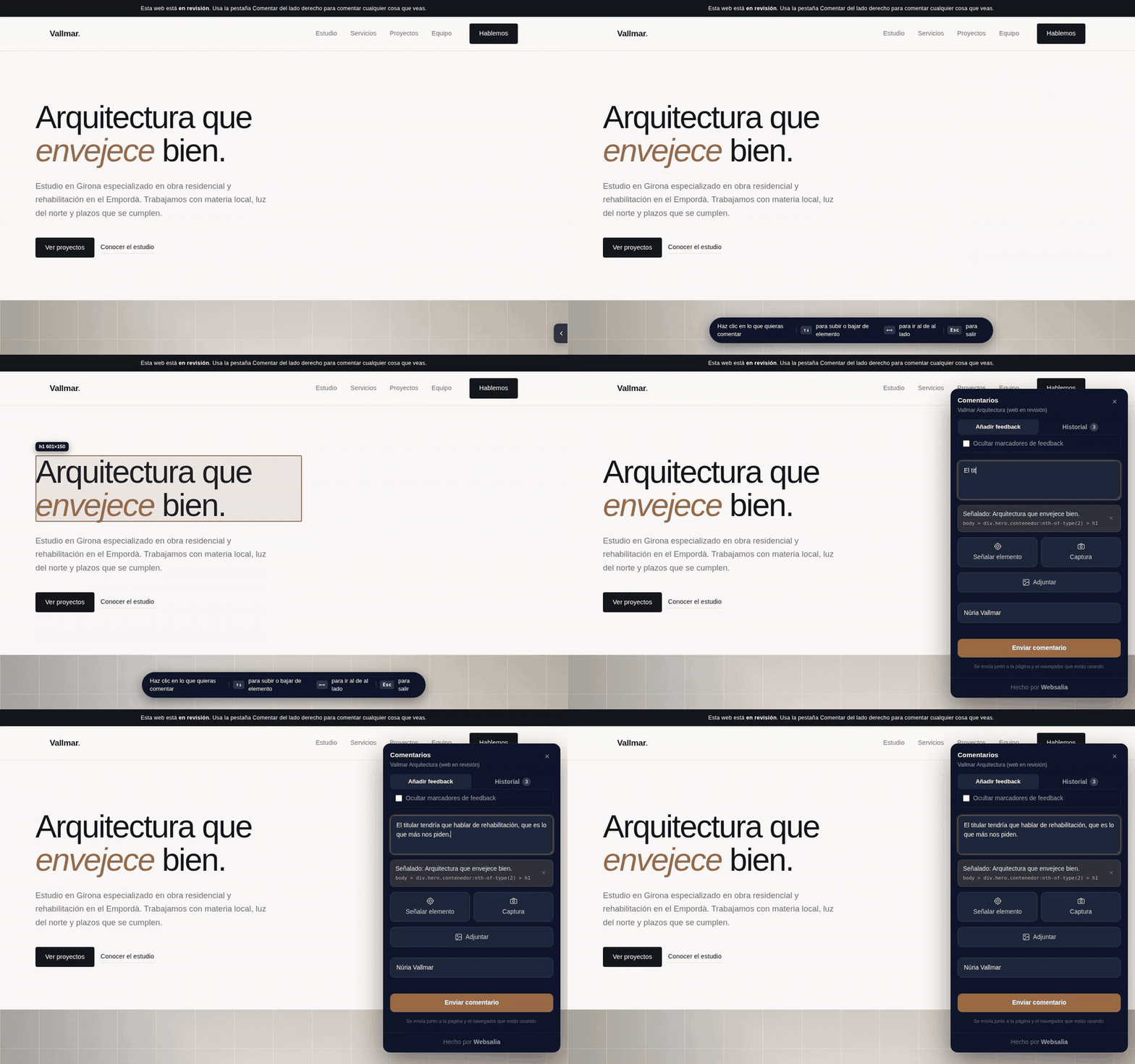
A floating button you drop into a site you are building. The client points at the exact element, writes one line, attaches a screenshot, and it lands in your inbox with the CSS selector and the browser they were using.
No account, no SaaS, no per-seat pricing. One <script> tag
and a Cloudflare Worker you own.
Why
Every agency knows this email:
"the button at the top doesn't convince me, and the photo in the section about us looks weird on my phone"
Which button. Which page. Which phone. You end up in a five-email thread to find out what they meant, and then you do it again next week.
Feedtack turns that into: the client clicks the element, types one line, and you get
#services > div.grid:nth-of-type(2) > article with a screenshot attached.
There are good tools that do this. They are subscription services, the free tiers stop at one user or one project, and your clients' comments live on someone else's server. This one is free, has no tiers, and the data sits in your own Cloudflare account.
What it does
Point at one or more elements
Inspector-style highlight that stores the CSS selector, the text and the position. The arrow keys walk the hierarchy, because the mouse only ever reaches the deepest element and in a hero with a slider you need to choose between the photo, the slide and the slider.
Screenshots and image attachments
A capture of what they are looking at, plus any images they want to attach, all inside the same comment.
The comments come back
They are stored, so the client sees what they already said, grouped by page, and can edit or delete their own. Every edit emails you the previous text struck through, so you never work off a stale version.
Numbered pins on the page
Plus a ruler down the scrollbar: where the open work is, at a glance. One click hides them when they get in the way.
Who asked for what
Each reviewer gets a personal link and every comment from that browser is signed. If nobody used a link, the name is asked once and remembered.
Every comment is a thread
Anyone can reply, as many times as needed, and a reply can point at an area or attach an image too. The conversation stays next to the thing it is about.
A workflow, not an inbox
Open, resolved, confirmed or reopened. Whoever wrote a comment can close it themselves, and your team can close their own notes in one step.
Spanish and English
Picked up from the page's lang attribute, or forced per site. The client guide
exists in both languages too.
It doesn't care what your site is built with
Plain JavaScript, zero dependencies, no build step, isolated in a Shadow DOM so the host site's
CSS cannot break it. Anywhere you can put a <script> tag.
| Stack | Where it goes |
|---|---|
| WordPress | The plugin, which also carries the production lock |
| Astro, Eleventy, Hugo | Your base layout, before </body> |
| React, Next, Vue | index.html or your root layout |
| Plain HTML | Before </body> |
| Shopify, Squarespace, Wix | Their custom code section, on paid plans |
One tag
<script src="/feedtack.js"
        data-site="client-slug"
        data-endpoint="https://your-worker.workers.dev"
        data-color="#4f46e5" defer></script>
You copy widget/feedtack.js into your own site, so nothing on your clients' pages
depends on a repository or a CDN of ours staying up. You also need a backend of your own: a
Cloudflare Worker with a D1 database and an R2 bucket, about twenty minutes the first time.
The docs walk through it from scratch.
For the people reviewing
Your client should not have to read any of the above. There is a short guide written for them, in Spanish and English, with a clip per action: how to point, how to attach a screenshot, how to reply, how to say something is fixed. Send them that link and nothing else.