1. Deploy your own backend
About twenty minutes the first time. The backend is a Cloudflare Worker that you own and deploy. Nothing runs on our servers and nothing is billed to us: your comments, your database, your attachments, your email account.
What you need first
| What | Cost | |
|---|---|---|
| 1 | A Cloudflare account. Sign up with an email, no card needed to start. | Free tier |
| 2 | An R2 subscription on that account. In Cloudflare's words: Storage & databases > R2 > Overview, then complete the checkout flow. It is a checkout, not a bill: the free allowance below still applies. | Free tier |
| 3 | A Resend account with a verified sending domain, and an API key. Resend is what delivers the notification emails. | Free tier |
| 4 | Node.js 18 or newer on your machine, to run Cloudflare's
wrangler CLI. You do not install it globally: npx fetches
it. | Free |
You can use any other transactional email provider, but you would have to change
enviarCorreo() in worker/src/index.js. Out of the box it is Resend.
Get the code and log in
git clone https://github.com/alvaromassana/feedtack.git
cd feedtack/worker
npx wrangler login          # opens the browser and links the CLI to your account
Create the three pieces of storage
The Worker needs three Cloudflare resources. Create all three before
deploying: wrangler deploy reads wrangler.toml, and a
binding pointing at something that does not exist will stop the deploy.
# 1. The database, where the comments live
npx wrangler d1 create feedtack          # copy the database_id it prints

# 2. The bucket, where the screenshots live
npx wrangler r2 bucket create feedtack-adjuntos
The third one, the Durable Object that batches the notifications, needs no
command: the migration already declared in wrangler.toml creates it on the
first deploy.
Fill in wrangler.toml
Open worker/wrangler.toml and set:
| Field | What to put |
|---|---|
database_id | The id that d1 create printed. |
DESTINO | The address the comments are emailed to, normally yours. |
REMITENTE | The sender, on a domain you verified in Resend, for example
Feedtack <feedtack@youragency.com>. |
ORIGENES_PERMITIDOS | Comma-separated list of the sites allowed to send
comments. Wildcards like *.pages.dev work. Anything else is blocked by CORS, on purpose. |
BASE_PUBLICA | Your Worker's own URL, so screenshots too big for the email get a download link. Leave it empty and the attachments simply travel without a link. You only know the URL after the first deploy, so fill this one in and deploy again. |
VENTANA_MINUTOS and CORTE_COMENTARIOS control how comments are
grouped into one email. The defaults are sensible; leave them alone until the volume tells
you otherwise.
Create the tables, deploy, and set the secrets
npx wrangler d1 execute feedtack --remote --file=esquema.sql
npx wrangler deploy                                          # prints your Worker's URL

npx wrangler secret put RESEND_API_KEY                       # your Resend key
openssl rand -hex 24 | npx wrangler secret put CLAVE_ADMIN   # your team key, save it
Now put that Worker URL into BASE_PUBLICA in wrangler.toml and run
npx wrangler deploy once more.
Check it is up
curl https://your-worker.workers.dev/salud # {"ok":true}If you get anything else, the usual suspects are a database_id that was not
pasted in, the R2 bucket not created, or the schema not run against --remote.
What this costs you, in practice
A review tool moves a handful of comments a day, so the free tiers are not a constraint. Checked against the providers' own pricing pages on 19 September 2026:
| Free allowance | Limit |
|---|---|
| Cloudflare Workers | 100,000 requests / day |
| Cloudflare D1 | 5 GB stored, 5 million rows read / day, 100,000 rows written / day |
| Cloudflare R2 | 10 GB stored / month, egress free |
| Resend | 3,000 emails / month, 100 / day |
An agency with thirty client sites under review will not get near any of those. If you ever do outgrow them, you are the one who decides whether to pay, and to whom. We never see any of it.
2. Add the widget
Two ways in, pick one:
| Your site | What to do | Why |
|---|---|---|
| WordPress | Install the plugin | A settings screen instead of editing templates, and it refuses to load on a production site. |
| Anything else | Paste the tag, below | Astro, Eleventy, Hugo, React, Next, Vue, plain HTML, Shopify, Squarespace, Wix. |
The plugin and the tag load exactly the same widget and talk to the same Worker. Nothing else in this guide changes depending on which one you choose. On WordPress you can jump to the plugin and skip the rest of this section.
Paste the tag
🔴 There is no production guardrail here. The widget file has no idea which site it is on, so the tag loads whenever it is present. On a live site every visitor would see the button, write comments and read everyone else's. Removing the tag before you go live is on you. The WordPress plugin is the one that has the lock.
Host the file yourself. Copy widget/feedtack.js (103 KB,
28 KB gzipped, zero dependencies) next to your site's other assets and point the tag at
your own copy:
<script src="/feedtack.js"
        data-site="client-slug"
        data-endpoint="https://your-worker.workers.dev"
        data-color="#4f46e5"
        defer></script>
This is the recommended way and it is what makes the install genuinely yours: your site stops depending on anyone else's repository or CDN staying up, and an update only happens when you decide to copy a new file.
If you would rather not host it, jsDelivr serves it straight from this repository:
<script src="https://cdn.jsdelivr.net/gh/alvaromassana/feedtack@main/widget/feedtack.js" ...@main tracks this repository's main branch, so your clients'
sites pick up our changes the moment we push them, including the broken ones. If you use the
CDN, pin it to a release tag rather than @main, for example
@v1.0.0
(releases).
| Attribute | What for | Default |
|---|---|---|
data-site | Identifies the client, shows up in the email subject. | sin-identificar |
data-endpoint | Your Worker's base URL. | none, required |
data-color | Accent colour, usually the client's brand. | #4f46e5 |
data-label | Button text. | Comentar / Comment |
data-position | borde-derecho (a tab on the right edge), bottom-right, bottom-left, top-right. | borde-derecho |
data-lang | es or en, overrides the page's lang. | auto |
3. Hand out the links
- Your team. Open the site once with
?feedtack_admin=YOUR_KEY. It is remembered in that browser. With the key you can resolve, mark your own notes as done, reopen and delete. - Each reviewer. Send them
https://staging.example.com/?feedtack_yo=Their%20Name. From then on everything they write is signed, and they can edit or delete their own comments. Without a link, the widget asks for a name the first time and remembers it.
Without the key you can write, edit and delete your own, and confirm or reopen what has been resolved. Nothing else.
?tack_yo= and ?tack_admin= links and still reads the identity saved
in the browser under the old name.
The WordPress plugin
This is the recommended route on WordPress, and it replaces step 2: you do not paste any tag.
Download
feedtack.zip and install it like any other plugin. The widget file travels
inside the zip and is served from your own site, so the plugin has no external dependency.
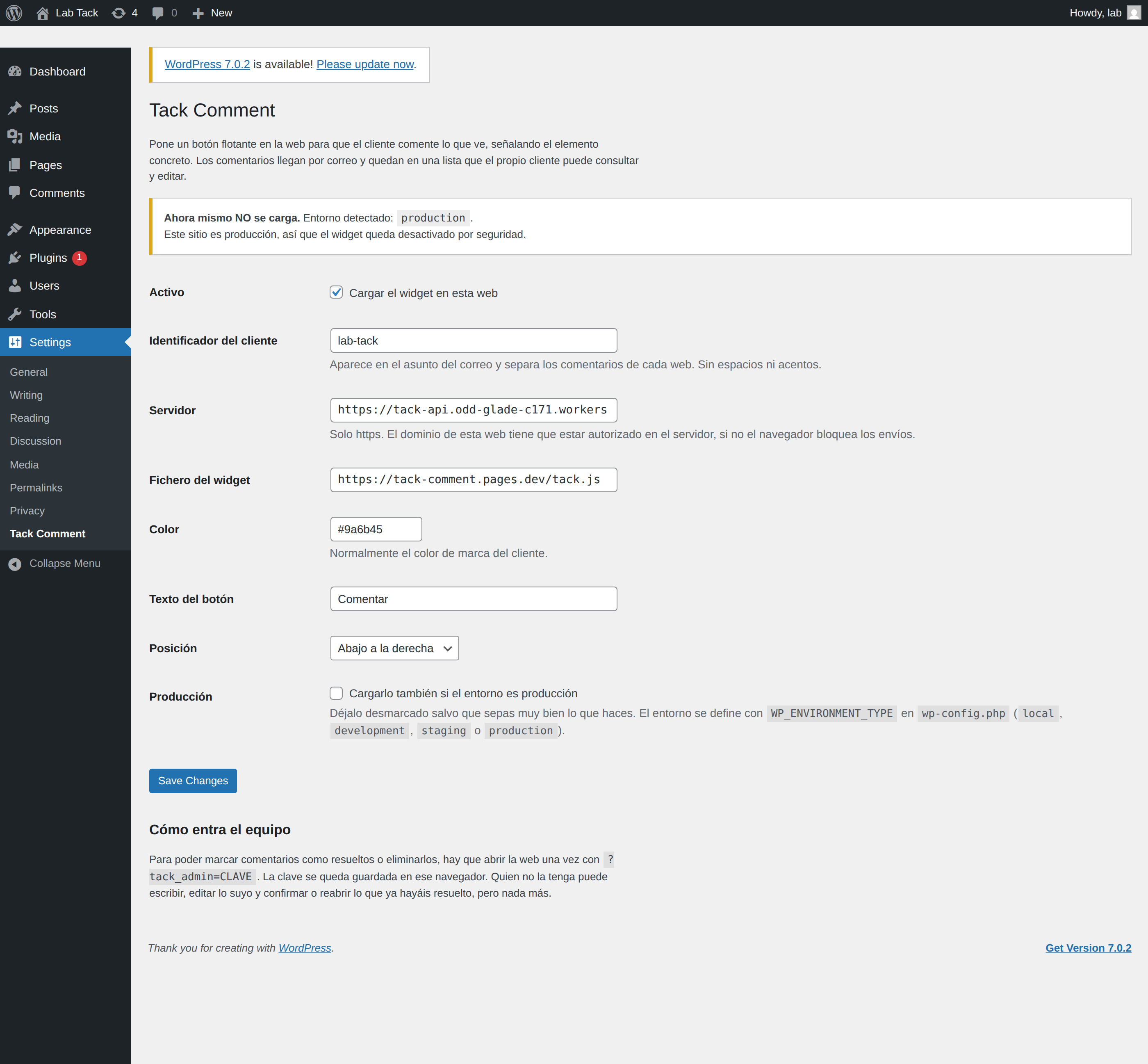
Settings live under
Settings → Feedtack: site slug, Worker endpoint, colour, button text, position and panel
language. Leave the language empty to follow the page's lang, and set it when the
site is written in one language and reviewed in another.
The reason it exists is not compatibility, it is the lock: it will not load if
wp_get_environment_type() returns production, unless you tick a box,
which then shows a permanent red warning. It also stays out of the admin, ajax calls, cron and
feeds. The environment comes from WP_ENVIRONMENT_TYPE in wp-config.php.
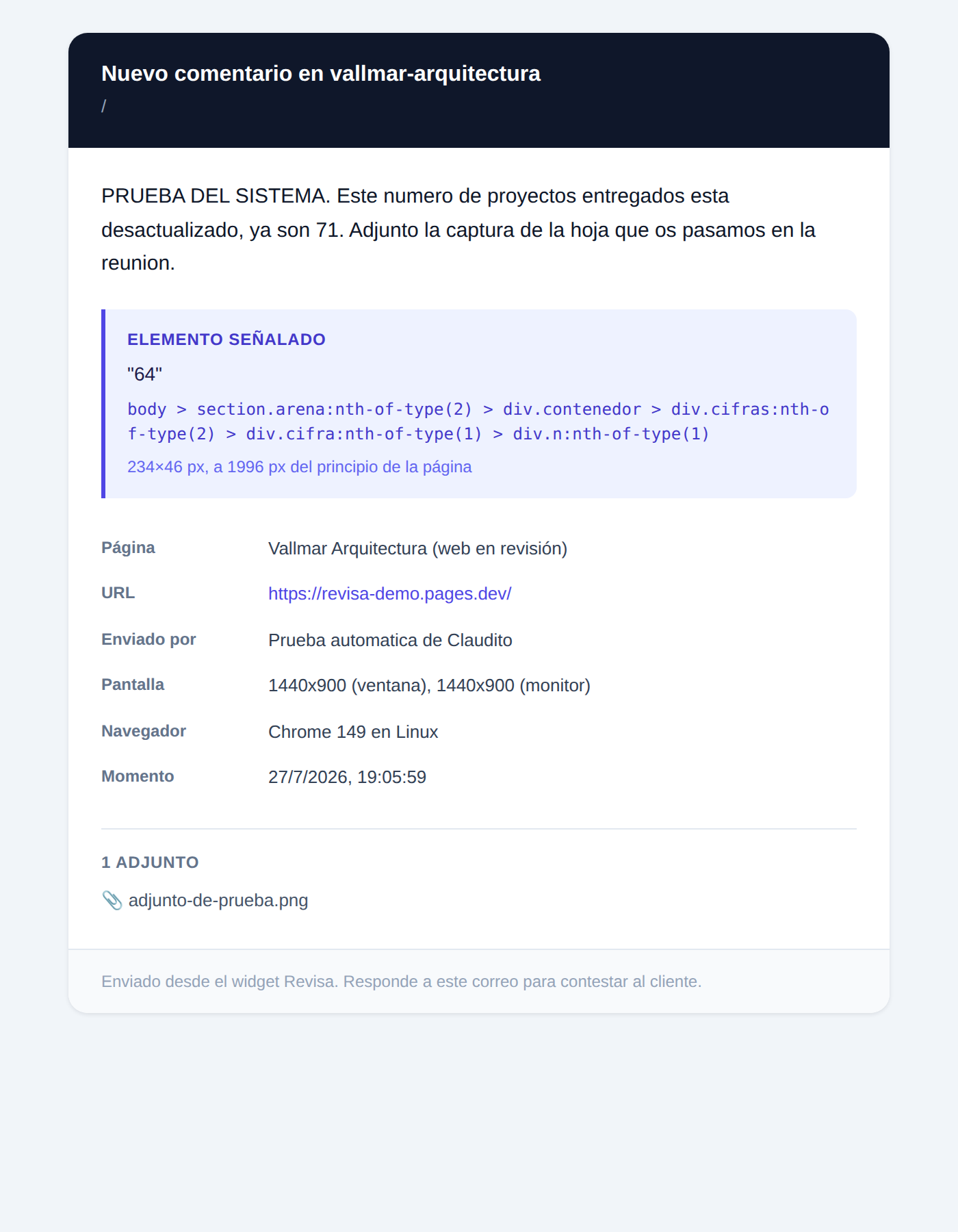
What lands in your inbox
Every new comment, edit, reopening and deletion sends an email with the text (previous version struck through on edits), the pointed elements with their selectors and sizes, the attachments, and the context: page, URL, viewport, browser, OS, scroll position and time.
The review workflow
open  ──(your team, with the key)──>  resolved  ──(the client)──>  confirmed
  ^                                       │
  └───────────(the client)──────────  reopened
The client writes and can edit their own while it is not closed. Your team resolves. The client confirms or reopens, and you get an email either way. Deleting, by the team or by the author, emails a copy, which is the only trace that is kept.
What is stored, and where
One table in your own D1 database, comentarios: the text, the pointed elements
(selector, text, position), the page, the anonymous author id and name, the state, a history of
state changes and previous texts, and the browser context. Replies live in their own table.
The schema is
worker/esquema.sql.
Attachments are emailed, not stored. The panel shows the count, not the files. Storing them would mean adding R2.
Honest limitations
- Identity is not authentication. Who wrote what is an anonymous id in
localStorage. Enough for a private staging site, not enough for anything sensitive. Switch browsers and you lose the ability to edit what you wrote: a personal link restores the name, not the id. - No rate limiting. An allowed domain can send as much as it likes.
- Editing changes the text and the pointed elements, not the attachments.
- Screenshots use
getDisplayMedia, so the browser asks the reviewer to share their screen. On browsers without it they can attach a screenshot they took themselves.
The full picture is in SECURITY.md.
The guide for the people reviewing
Your client should not read any of this page. Send them the guide instead: Spanish or English, one short clip per action. There is also a narrated version. Same page for every client, no sign-up, no names inside.
It shows the interface, so it stops being true the day the interface changes. Regenerate it
with node qa/guia-clips.mjs and deploy again.